In legacy Wireless, detection of radar signal on AP radios serving channels would need channel switch or reduction in channel width. 802.11be introduces DFS puncturing feature wherein AP and client station can continue to leverage existing channel width except for the subchannel on which radar is detected.
Understanding the DFS puncturing-
- DFS puncturing to work as expected needs support on both, DUT and Client Station.
- Punctured channel information is advertised in Beacon, Association Response and QoS data.
- Client station advertises channel puncturing support in Association Request frame
Scenario–
AP 5G Band radio operating on channel 100 and 160 MHz cw with radar detected on channel 108.
DFS Channel puncturing advertisements
Beacon Frame-
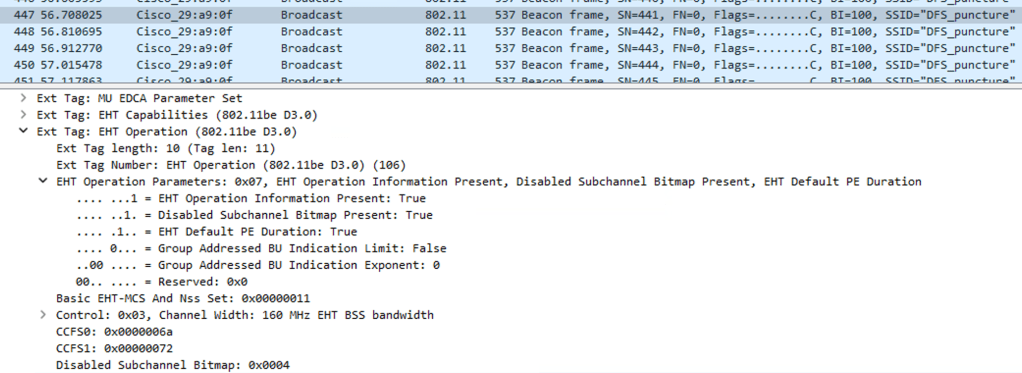
DUT AP advertises channel puncturing bitmap and punctured subchannel information in the EHT beacon frame under EHT Capabilities-
Navigate to IEEE 802.11 Wireless management>Tagged Parameters>EHT Operation>EHT Operation Parameters
- Disabled Subchannel Bitmap Present: True- Represents Channel Puncturing Exists
- Disabled Subchannel Bitmap- 0x0004 (hex conversion is 108 which is the channel punctured)
Verify the same on AP CLI-
AP#sh controllers dot11Radio 1
Configured Frequency: (Slot 1) 5500 MHz Channel: 100 160MHz
Puncture bitmap: 0x4
Punctured Channels: 108
Association Request-
Client Station (Qualcomm Fastconnect 7800) advertises channel puncturing preamble which advertises the subchannels on which the client will support puncturing.
Navigate to IEEE 802.11 Wireless management>Tagged Parameters>HE Capabilities>HE PHY Capabilities Information>Bits 8 to 23.
- The Punctured Preamble Rx represents the channels on which the client will support puncturing out of the total AP radio channel width.
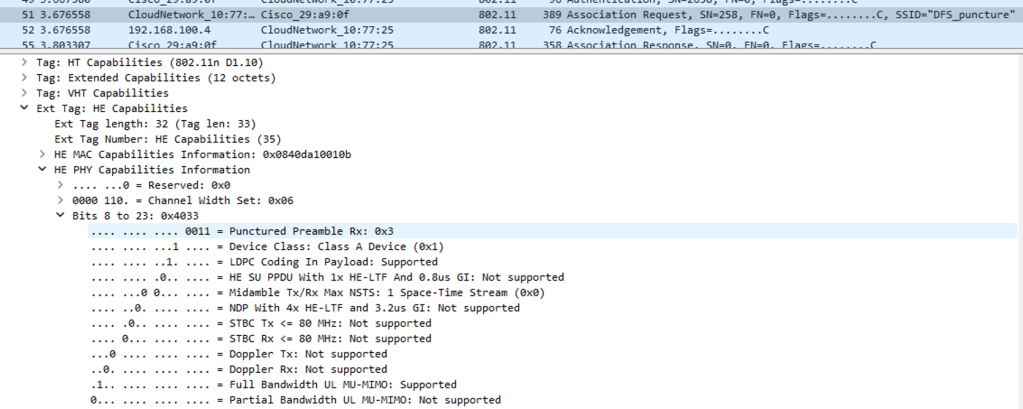
| Bit | Value (Binary) | Meaning on 160 MHz channel |
| Bit 0 | 0001 | Supports puncturing of secondary 20 MHz (in primary 80 MHz |
| Bit 1 | 0010 | Supports puncturing in secondary 40 MHz (the outer 40 MHz of secondary 80 MHz) |
| Bit 2 | 0100 | Supports puncturing in secondary 80 MHz |
| Bit 3 | 1000 | Reserved/Add. Puncturing Pattern support |
Punctured Preamble Rx for a client station which does not support puncturing appears as follows
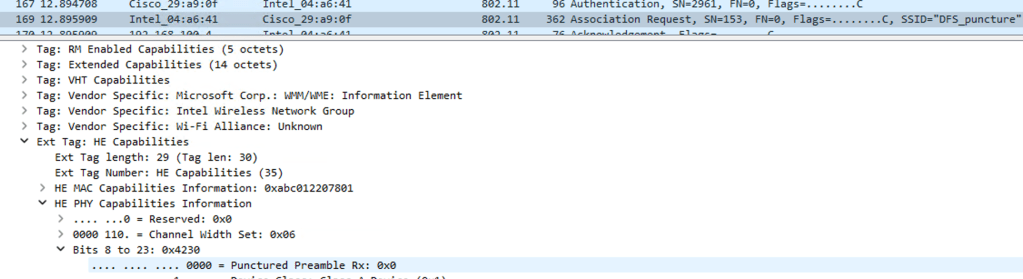
- Punctured Preamble rx 0x0- Represents no support for channel puncturing
Association Response
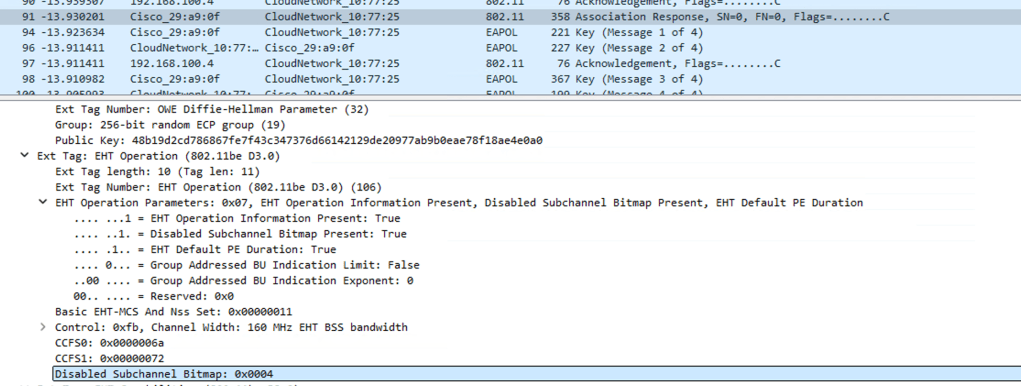
DUT AP advertises channel puncturing support in the Association Response frame.
Navigate to Navigate to IEEE 802.11 Wireless management>Tagged Parameters>EHT Operation>EHT Operation Parameters
- Disabled Subchannel Bitmap Present: True- Represents Channel Puncturing Exists
- Disabled Subchannel Bitmap- 0x0004 (hex conversion is 108 which is the channel punctured)
Observations–
SA settings-
- Center Frequency- 5.5 GHz
- Span- 320 MHz
- Sweep- 10s
Before Radar injection-
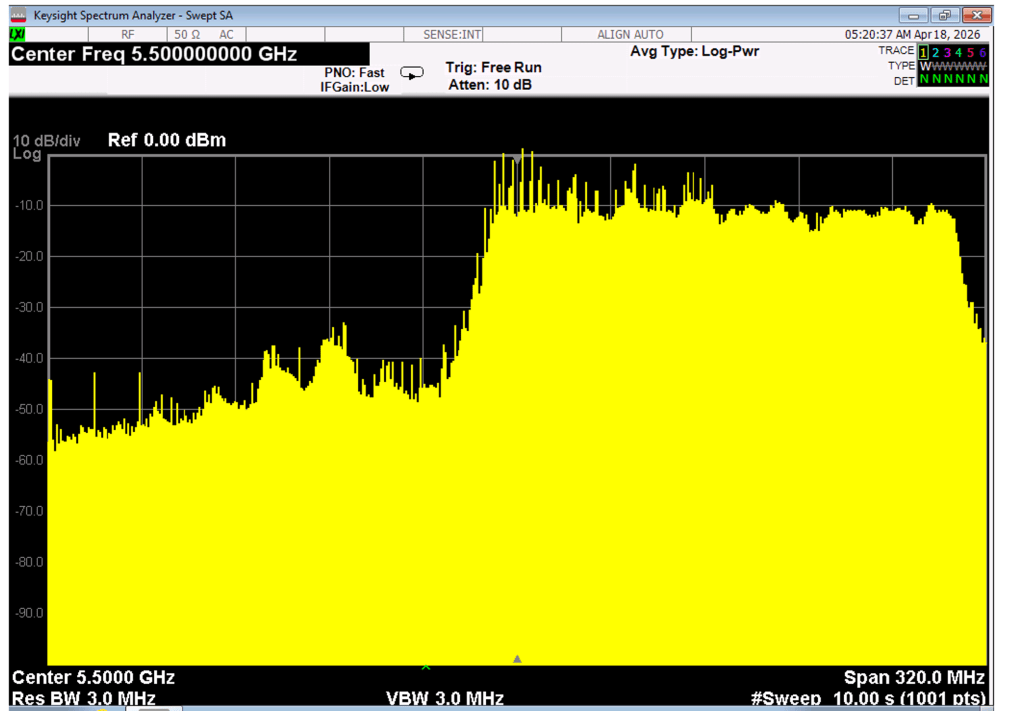
QoS data utilizing full available channel width 160 MHz.
After Radar injection-
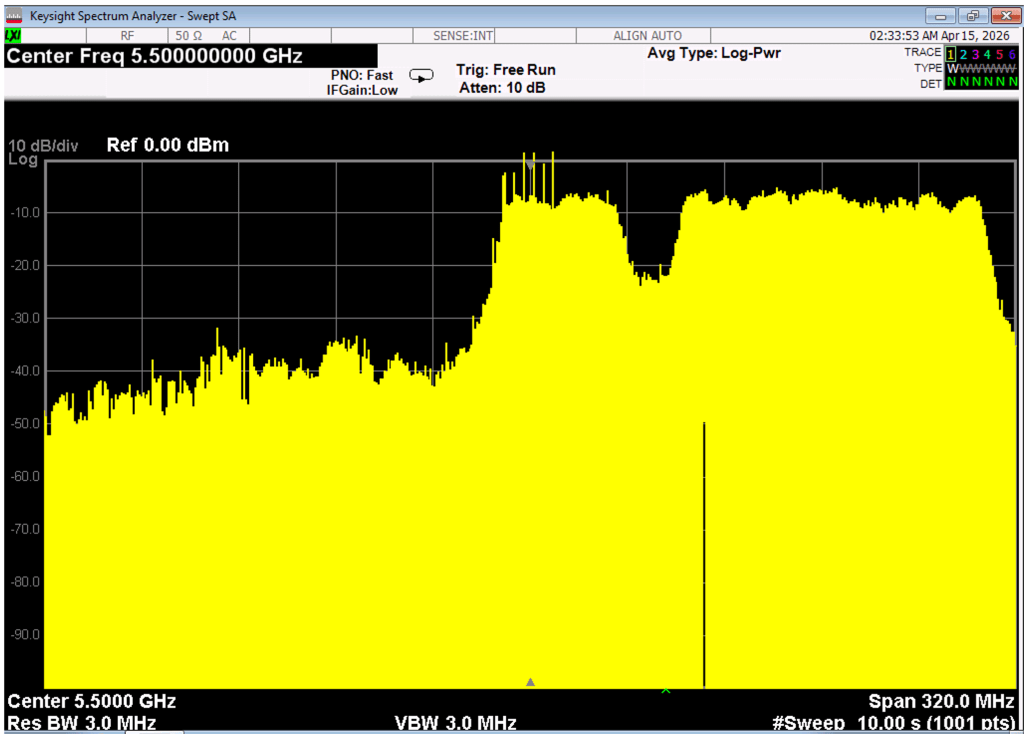
QoS data is not being transmitted on channel 108 but remainder channel width from 160 MHz utilized.
Related Blogs-


Leave a Reply