We need to design and configure the wireless network such that we have overlapping service areas between neighboring APs. These APs need to be set to non-overlapping channels else it would result in interference. The goal of using different non-overlapping channels is to avoid high channel utilization and interference.
Channel Utilization: When there is excessive number of APs and clients using the same channel this will result in excessive division in airtime for each client. Moreover, multiple clients transmitting at the same time on the same channel will result in collisions. To avoid these collisions, 802.11 wireless devices use a listen before speaking approach when accessing the wireless medium. The client devices detect if there is any device transmitting on the same channel and if so it will perform a random back-off for a short period of time after which it will check if the channel is free to transmit. This process is called Clear Channel Assessment CCA. If the channel is clear after a check, the device can access the channel and send some data. With increasing number of client devices the waiting time increases resulting in poor wireless performance.
Interference: Clear Channel Assessment avoids the collisions when the client devices are transmitting on the same channel but it does not avoid the collisions between signals transmitted by client devices on the channels which have frequency overlap. Apart from 802.11 devices, there are other interfering sources using the 2.4 GHz and 5 GHz. These are devices which can potentially act as interferers in 2.4 GHz-
- Microwave ovens
- Cordless phones
- Bluetooth devices
- Wireless video cameras
- Outdoor microwave links
- Wireless peripherals
- PDAs, cellphones
- Zigbee – Wireless personal area network technology
- Fluorescent lights
Interfering sources in 5 GHz band-
- Cordless phones
- Radar
- Perimeter sensors
- Digital satellite
2.4 GHz Band:
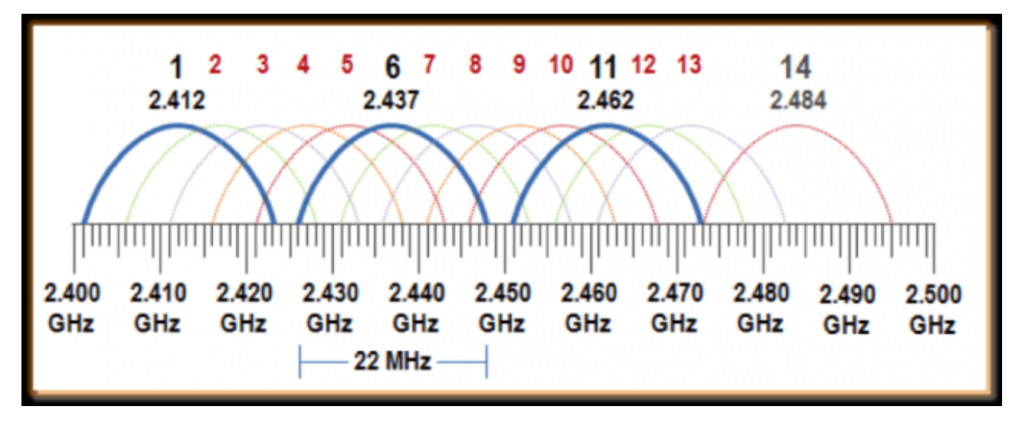
There are a total of 14 channels in 2.4 GHz ISM band which are 22 MHz wide each. There are only 3 non-overlapping channels which are 1, 6 and 11 respectively. It is not recommended to use any of the overlapping channels to avoid interference. Considering the high utilization and interference on 2.4 GHz, it is recommended to try force the clients to transmit on 5 GHz band if they have a 5 GHz radio using ‘Dual Band Operation with Steering’. This will provide legacy clients sufficient airtime on the 2.4 GHz band.
5 GHz Band:
The 802.11 standard defines 23 20MHz wide channels in the 5 GHz spectrum. Each channel is spaced 20MHz apart and separated into three Unlicensed National Information Infrastructure (UNII) bands. In the United States, UNII-1 (5.150 to 5.250 GHz) containing channels 36, 40, 44, and 48 and UNII-3 (5.725-5.825) containing channels 149, 153, 157, 161 are permitted. UNII-2 (5.250-5.350 GHz and 5.470-5.725 GHz) which contains channels 52, 56, 60, 64, 100, 104, 108, 112, 116, 120, 124, 128, 132, 136, and 140 are permitted in the United States, but shared with radar systems. We can either configure the APs not to use the DFS channels, if the AP is broadcasting on DFS channel and if it detects a radar signal it has to switch to a new channel. I will explain the operation of DFS in a separate article. The following image shows 5 GHz channels-
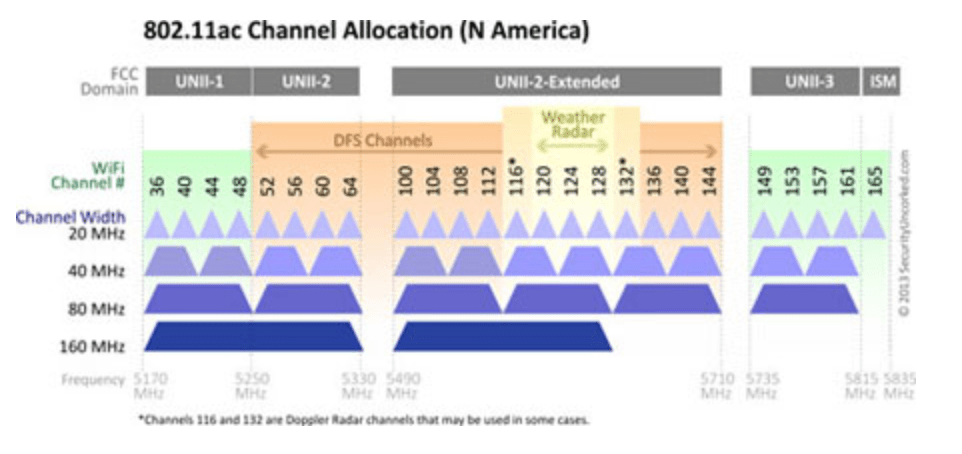
Although there are sufficient number of 5 GHz channels for channel reusability but increasing the channel width to 40 MHz, 80 MHz and so on decreases the number of available non-overlapping channels. It is important to account channel overlap and interference when increasing the channel width especially in environments with large number of APs.
Related Blogs
Deployment Guides
High Density Wi-Fi Deployments
Education Institutes Wi-Fi Deployments
Quick Reads
Why are network admins configuring multiple WLANs?
 blogscisco.com