The wireless association process consists of multiple steps-
- Probe Request
- Probe Response
- Authentication request
- Authentication response
- Association request
- Association response
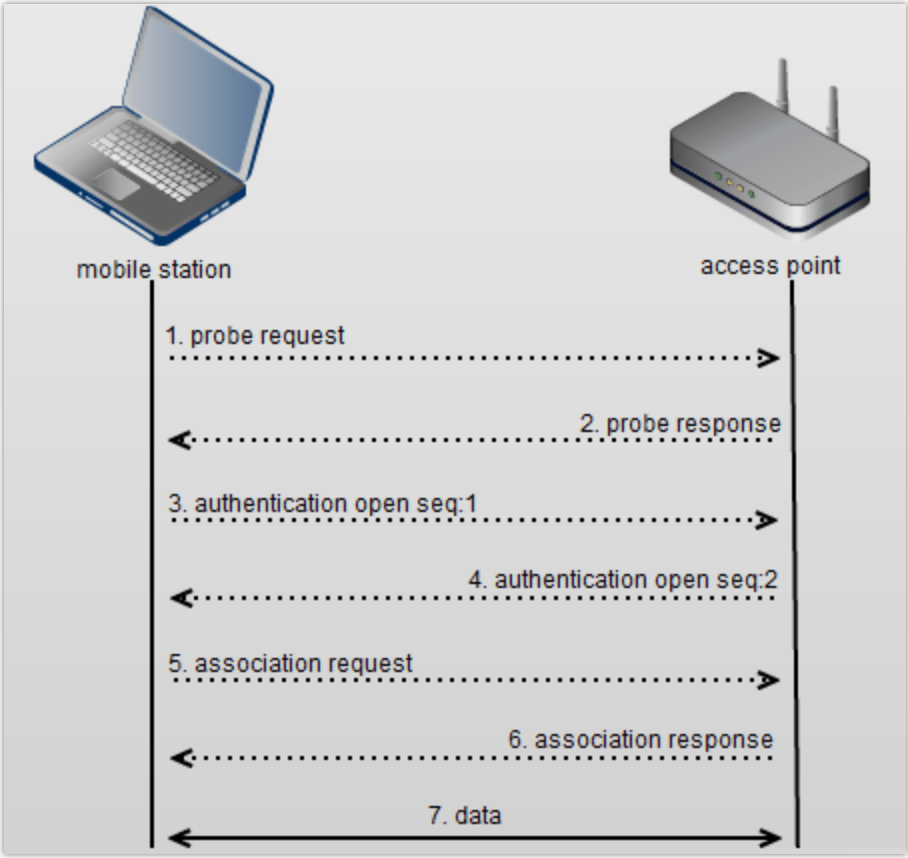
Probe Request: The client devices sends a probe request to discover all the 802.11 networks in its proximity. The client device advertises its supported data rates and the 802.11 protocols that it supports. All the APs that can hear the probe request respond to the client with a probe response.
Probe Response: The AP responds to the probe request with a probe response advertising the SSID (wireless network name), supported data rates, authentication types if required, and other 802.11 capabilities of the AP.
Authentication Request: The client device sends an authentication request to the APs, a client can be authenticated to multiple APs but associated to one AP at a time. Keep in mind this authentication request is not for WPA/WPA2 or 802.1X, this is low level authentication.
Authentication Response: The AP sends an authentication response to the client device in response to the authentication request. If an AP receives any other frame when the client device is authenticated but not associated it sends a disassociation frame to the client device.
Association Request: After being successfully authenticated the client device sends an association request to a particular AP.
Association Response: The AP sends an association response to the client device after which it can start sending data. The AP will have an unique ‘association ID‘ for the client device after it associates successfully.
Note: For authentication methods like WPA/WPA2 or 802.1X the client device needs to go through dynamic key exchange process and authentication after the association process before it can send data traffic.
Related Blogs
Comprehensive Reads
Quick Reads
Why Channel Planning is critical?
Wireless Troubleshooting
Minor Outage: Wireless client cannot connect to the internet!!
 blogscisco.com