We discussed how to associate a Wi-Fi 7 client to a Wi-Fi 7 6 GHz WLAN with 320 MHz cw in the previous blog. In this blog lets discuss how to troubleshoot if the client is not associating with 320 MHz cw.
Working Scenario
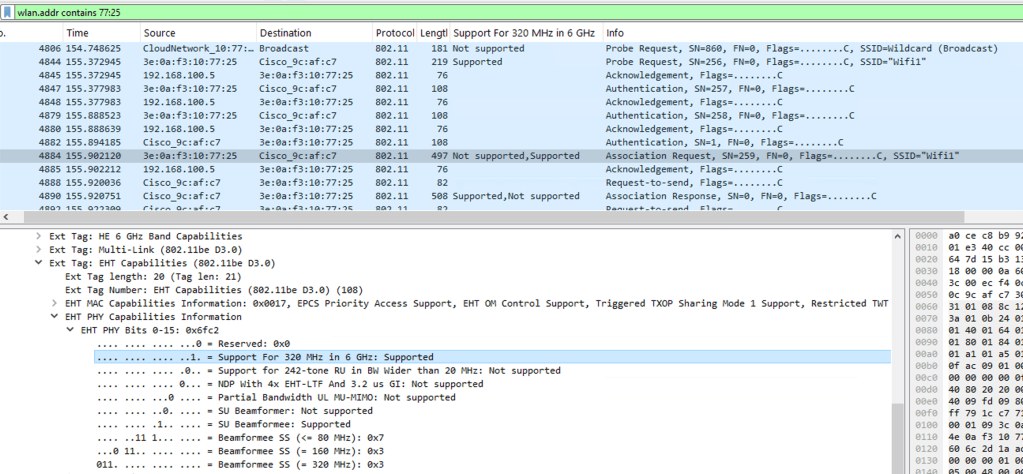
Lets go over a wireshark packet capture when the client is able to associate 320 MHz cw. In this scenario, we will observe that the AP is broadcasting the beacon for the WLAN with 320 MHz support and subsequently we will observe the client association process happening where we will observe that client also advertises 320 MHz cw support.
Beacon advertisement with 320 MHz cw support

Client association transaction with 320 MHz cw support
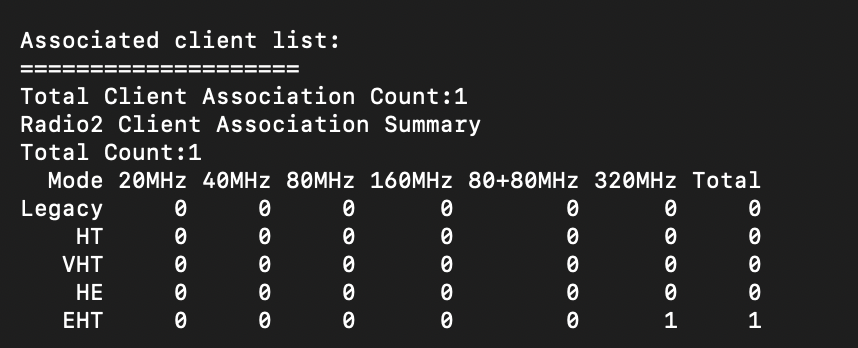
Client cw can be verified on the AP cli using the following command-
show controllers dot11Radio <6GHz slot number>
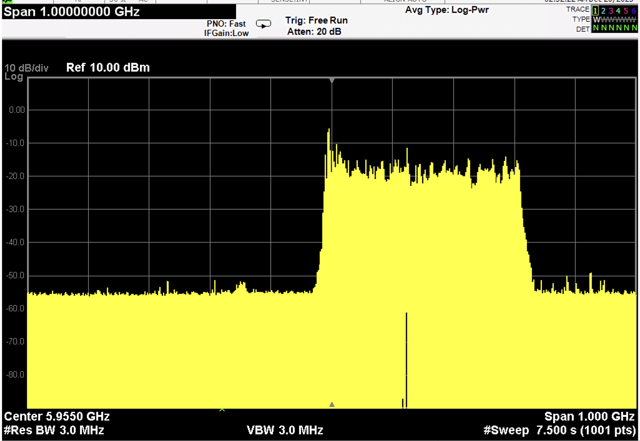
Client traffic sent with 320 MHz can be verified using a spectrum analyzer by configuring the center frequency to the primary channel frequency and the span to higher value like 500 MHz or 1 GHz. This will show the amount of cw occupied by the data traffic.
Non Working Scenario
We might run into a non- working scenario with these 3 possibilities
- AP beacon is broadcasting with cw lesser than 320 MHz.
- Client is not 320 MHz capable and is not advertising 320 MHz support during association process.
- 802.11 be is disabled on 6 GHz band (9800 WLC will not allow configuring 320 MHz cw on radio in this scenario)
Case 1- AP Beacon broadcasting with less than 320 MHz cw

Case 2- Client not capable of 320 MHz cw

There is no support for 320 MHz in 6 GHz for either of the association packets as seen above.
Related Blogs
Cisco Configuration Guides
How to associate my Wi-Fi 7 client on 6 GHz with 320M CW?
How to configure 320 MHz on higher channels?
How to use Cisco AP as a sniffer?
How to configure 9800 WLC for max throughput and max spatial streams?
Wireless for Beginners
Cisco Wireless
Dual Band and Quad Radio Cisco Wi-Fi 7 APs
Wireless Troubleshooting
Wireless Pcap using Airtool on MacOS
Minor Outage: Wireless client cannot connect to the internet!!
Full Wi-Fi bars but my Youtube is buffering!!
 blogscisco.com