How to configure 802.11 be data rates?
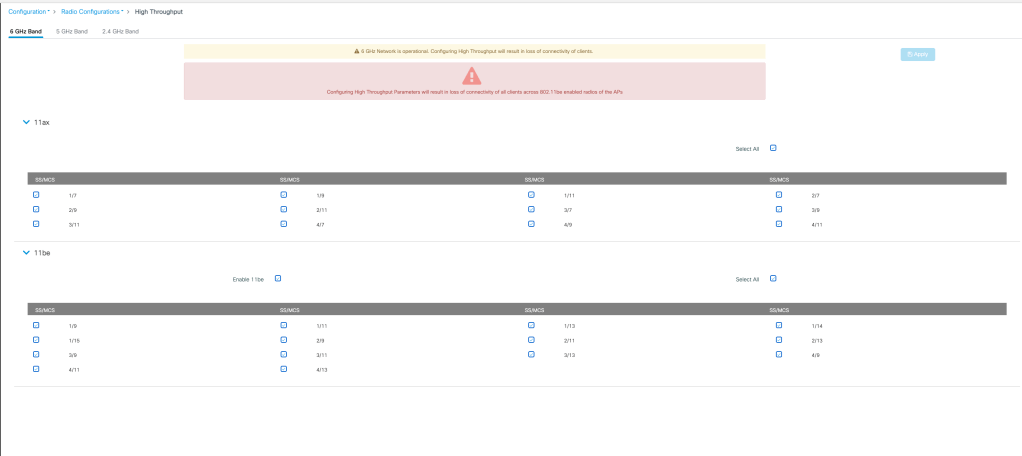
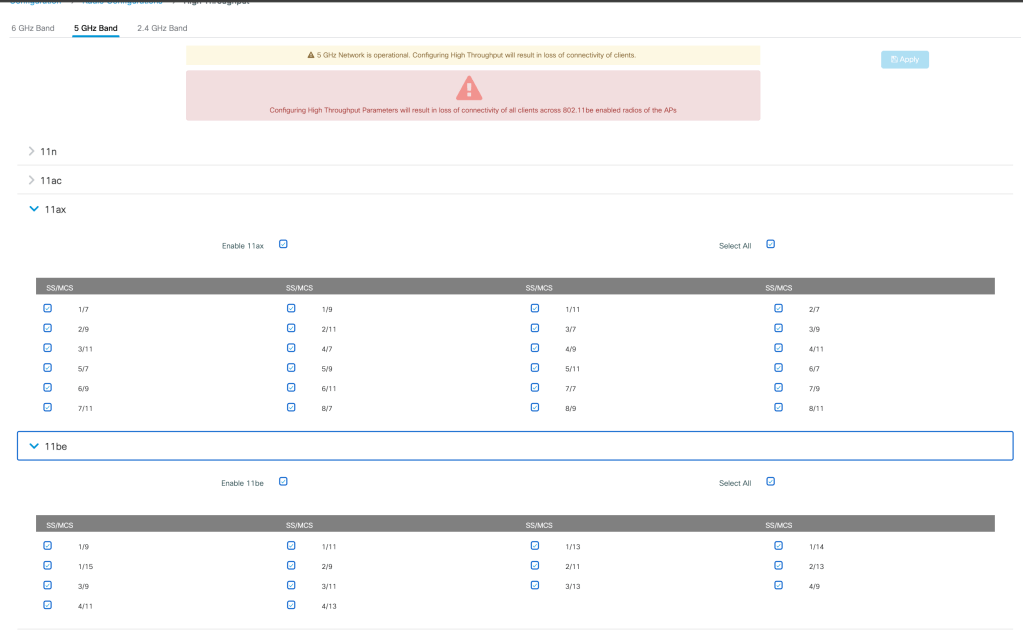
Before configuring the WLAN it is essential to enable 802.11 be MCS data rates on all 3 bands.
This setting is separately configured for each band under- Configuration>Radio Configuration>High Throughput>Band (2.4 GHz/5 GHz/ 6 GHz)

How to configure 802.11 be profile?
802.11 be profile can be configured under- Configuration>Tags and Profiles>802.11be
Select the necessary bands that can participate in MLO groups

How to configure WLAN for MLO client association?
Minimum requirements for configuring a WLAN for MLO client are as follows-
- Security Method- Layer 2>WPA3
- Encryption Method- GCMP 256
- PMF- Enabled
- AKM- OWE

Client Monitoring on WLC and AP
MLO client links can be monitored under Monitoring>Wireless>Clients

Client details can be monitored on AP CLI using the command-
show controller dot11Radio <slot number>

Related Blogs-
Cisco Configuration Guides
Configuring 802.1x Authentication for Enterprise Wireless
How to associate my Wi-Fi 7 client on 6 GHz with 320M CW?
How to configure 320 MHz on higher channels?
How to configure 9800 WLC for max throughput and max spatial streams?
Wireless troubleshooting
How to Troubleshoot 6 GHz 320 MHz cw client association?
Minor Outage: Wireless client cannot connect to the internet!!
 blogscisco.com