Dynamic Frequency Selection is the process of detecting radar signals that must be protected against interference from 5 GHz radios by dynamically switching the operating frequency of the radio to a non-DFS channel or other DFS channel without any radar signal.
When a 5G radio detects a radar signal, the 5G radio will disassociate its clients and move to a different channel. Clients associated to the remaining two bands wont be impacted during this process.
Following actions will be taken in case of DFS event-
-Blocks new transmissions on the channel.
-Broadcasts an 802.11h channel-switch announcement.
-Disassociates client associated to that radio.
-Access Point selects a different channel permitted within the regulatory domain.
-If a DFS channel has been statically assigned to an AP, after DFS non-occupancy period has been reached for the original DFS channel, if no clients are associated it will move back to the original DFS channel and scan for 60 seconds. If there are no radar signals on the new channel, the wireless device starts beaconing and clients can initiate associations. If there are no other DFS events and no wireless associations on 5G radio, the AP will revert to its old DFS channel in 30 minutes.
How to mitigate DFS channel issue?
If any DFS activity is detected on the operating channel of the AP radio, the AP will go through the channel change procedure mentioned above and mitigate the issue by itself. This would result in channel change and client disassociations etc. Although it is recommended to let RRM control the channel assignment of the AP radios from the complete set of channels (DFS and non-DFS) available in the given regulatory domain there are few customers who want to eliminate the channel changes resulting from DFS activity completely. There are two ways to eliminate DFS related channel changes-
Static Channel Assignment and Custom RF Profiles
Static Channel Assignment– Manually assign non DFS channels on the 5 GHz radio statically. Cisco AP needs to be configured in Client Serving mode to assign a static channel- Configuration>Access Points>5 GHz radios>AP>Role assignment>Client serving (shown below)
Static channel can be configured as follows-Configuration>Access Points>5 GHz radios>AP>RF Channel Assignment>Channel Number (shown below)
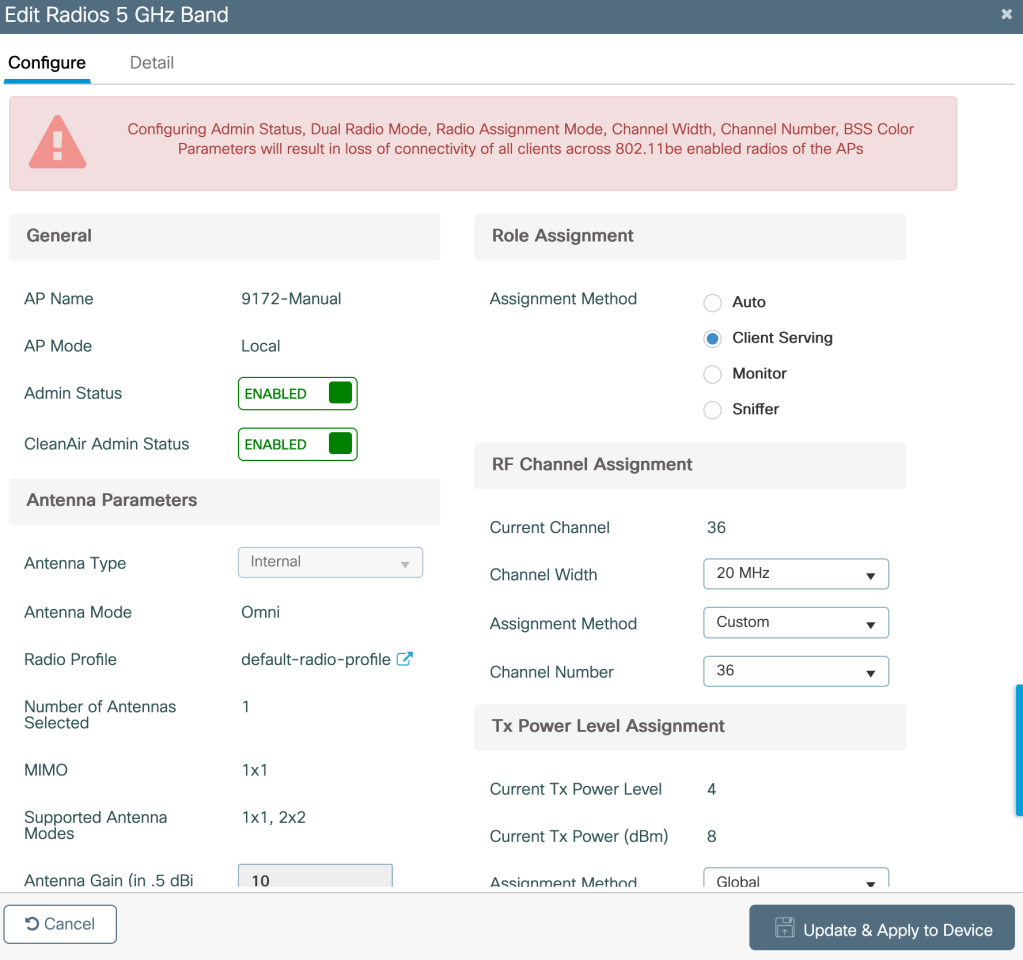
With higher number of APs in the environment, assigning channels statically without causing them to interfere becomes difficult. Also, changes in RF enviroment be it Interference or Noise on serving radio channel can significantly affect performance as RRM will not be triggering a channel change in this case.
Instead of statically assigning non DFS channels we can create custom RF profile which includes only non DFS channels in its DCA channel list.
Note: Eliminating all the DFS channels can result in significantly less number of available 5 GHz channels for RRM to assign from.
How to create a custom RF profile?
If one 9800 WLC has APs which are spread across various physical locations (few APs which have had multiple DFS events while others which are not located near DFS activity area), creating a custom RF profile and mapping it to specific Cisco APs which have multiple DFS activities can be helpful.
A custom RF profile provides the ability to create a custom DCA channel list which would consist of non DFS channels only. This would result in automatic non DFS channel assignment through RRM.
Custom RF profile can be created as follows- Configuration>Tags and Profiles>RF>Add profile>RRM>DCA> (Select non DFS channels under DCA channels list)

Map the Custom RF profile to the RF tag as follows- Configuration>Tags and Profile>Tags>RF>RF tag mapped to the AP>5 GHz Band RF profile

Related Blogs
Cisco Wireless Features
Comprehensive Reads
 blogscisco.com