Cisco AP radios can be assigned its channel width, either statically or dynamically. The recommended way to assign channels is through RRM which dynamically assigns channel width based on the available channels in DCA list that can be bonded together.
Why should we assign channel width dynamically?
- RF environments are dynamic, there could be more load on a certain radio while the adjoining AP’s radio might not be serving as many clients. Such a scenario requires the AP radio with more load to operate with higher channel width so that performance is not affected. If the AP radios are statically assigned channel width, RRM will not be able to adjust the channel width resulting in poor performance when the AP radio is serving high load.
- In larger environments, it is not a best practice to assign all AP radios with static 40/80 MHz channel width. With the limited number of channels we have in 5/6 GHz bands, there is high probablity that we will end up having overlapping service areas causing interference.
DBS algorithm
The DBS algorithm is typically controlled by RRM (Radio Resource Management). The primary goal for DBS algorithm is to assign appropriate channel width to the radio in scenarios where the AP radio is serving high load for an extended period of time. The goal is avoid performance degradation when there is increase in load on a particular AP radio in the environment.
RRM takes into consideration multiple factors like active load on the AP radio, available channels for the DCA list that would allow channel bonding, interference resulting from channel bonding etc. before triggering the channel width change driven by DBS.
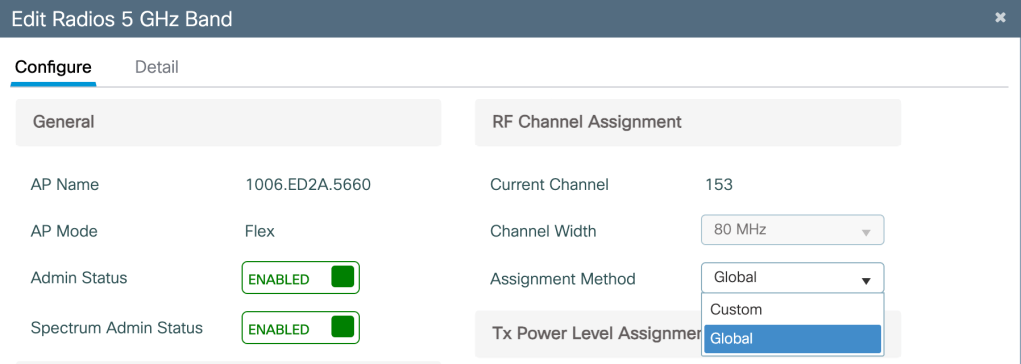
How to configure AP radio for DBS?
Configuration>Wireless>Access Points>Edit Radios(6G/5G/2.4G)>RF Channel Assignment> Assignment Method> Global
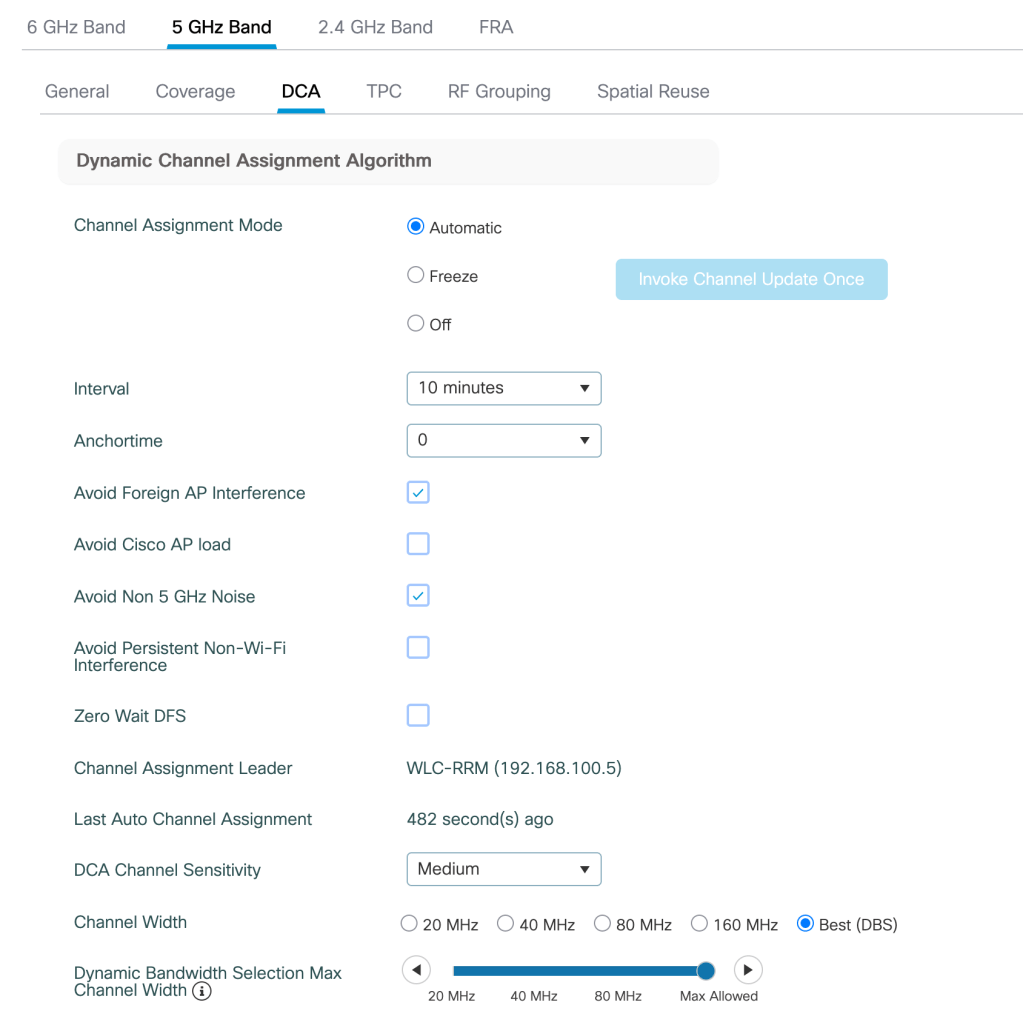
How to configure DBS under RRM?
Channel width setting needs to be configured under RRM as follows-
Configuration>RRM>5 GHz Band> DCA>Channel width>Best (DBS)
DCA parameters for 6 GHz are configured under- Configuration>Tags and Profiles>RF/Radio>RF>RF profile>RRM>DCA

Monitoring DBS on WLC-
Configuring 9800 WLC to monitor DBS

Channel width change reported on WLC

Related Blogs
Cisco Wireless Features
Comprehensive Reads
 blogscisco.com