Here are the most common myths that most customers believe in, be it any type of industry. I would suggest considering these points while deploying or modifying wireless networks.
- More the APs better the wireless performance: Most people believe more the APs better is the wireless performance, although adding APs fixes issues in some cases like dead spots that is not always the fix. More APs in an environment result in excessive overlapping service areas resulting in client flapping issues causing poor wireless performance. For a data network, a 15-20 percent service area overlap is recommended for efficient roaming within the network. Hence, just throwing in more APs to fix wireless performance issues is a straight NO.

- More the AP power level better the performance: Most people tend to increase the power level of the APs to address any type of wireless performance/dead spot issue. More APs and more power level, both these go hand in hand as far as the consequence is concerned, excessive overlapping service areas resulting in poor wireless performance as explained earlier. Most APs let you choose automatic power reduction which adjusts the AP power level to optimize the service areas of the APs in the most efficient way. I recommend setting the APs to automatic power reduction instead of setting it to maximum. My next point explains how to address the issues caused by the more APs or high power, the answer is Wireless Design.
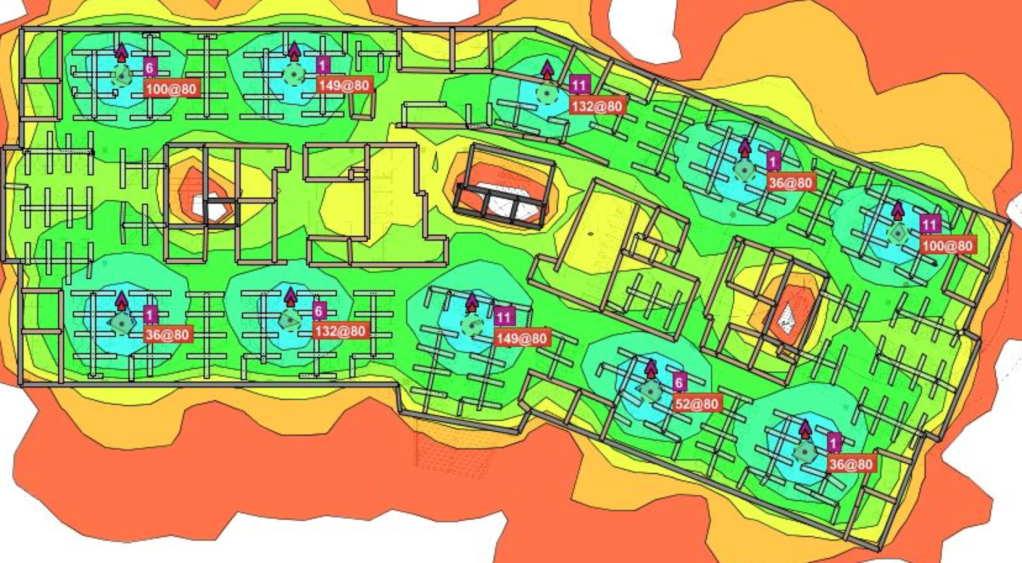
- Why do I need a Wireless RF Design or a Wireless Site survey?: Most people believe that they can approximately place APs in their environment and they will get the expected wireless results. Well, they are wrong because wireless coverage and performance can be affected by various aspects like interference, sources of attenuation in the environment and so on. I understand an RF survey is not required in all cases and also not feasible financially but I highly recommend performing a predictive RF design to determine the best AP locations in your RF environment. I have extensively used Ekahau site survey software to create predictive RF designs to determine best AP locations. The software lets you upload the floorplan, scale it, define the sources of attenuation like walls/restrooms/glass/elevators and you choose the model of the AP/APs that you plan on deploying and the software provides you with an approximate design of the AP locations. I recommend Predictive RF design for smaller environments but suggest Predictive RF design followed by a Passive/Active site survey for larger environments especially warehouses, stadiums and hospitals considering the number of factors these environments have that could possibly affect the wireless performance. Below figure shows a predictive RF design which provides approximate AP locations based on the RF environment factors defined.
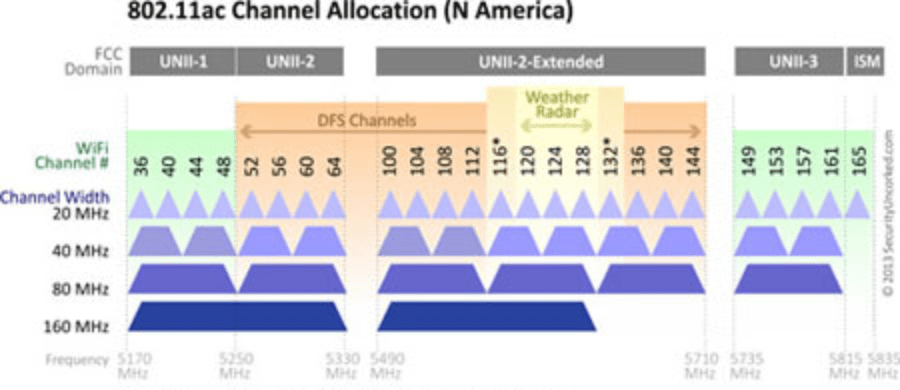
- 80 MHz channel width will increase my throughput: 80 MHz is meant to increase the channel width assigned but increasing the channel width implies that a single AP is using 4 channels, this results in lesser number of usable channels in the environment and if the environment has many APs, 80 MHz channel width is not a good idea. The image below shows the available usable 5 GHz channels and shows the reduction in usable channels if 80 MHz is used as the channel width as opposed to 20 or 40 MHz.
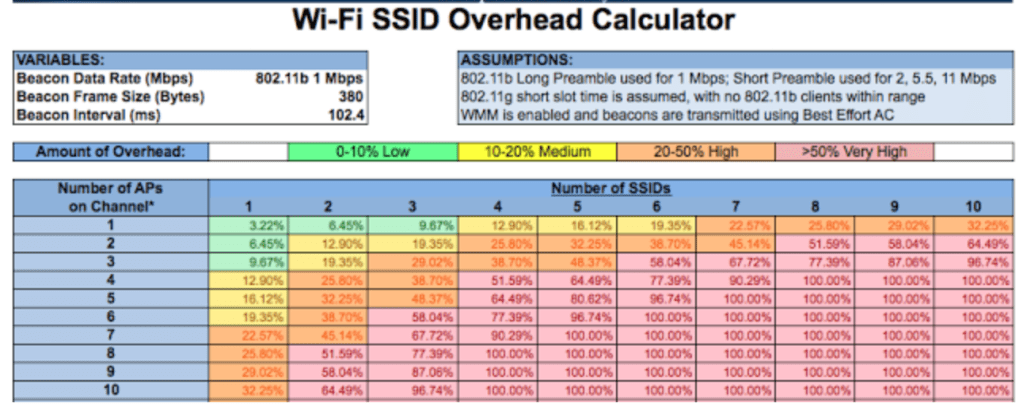
- I used more number of SSIDs to segment my network: Most customers believe the best way to segment their wireless network is to have more SSIDs without realizing that more number of SSIDs result in more amount of airtime utilized by management traffic. The image below shows the overhead calculation with respect to the number of SSIDs used vs the number of APs on the same channel. Adding SSIDs does not really segment the traffic if you still have them on the same VLAN. You can have a single SSID but still segment the traffic using NAC (Network access control) wherein a different level of privilege and VLAN can be assigned to device based on the credentials used by the user.
- Capacity vs Coverage Planning: Customers often tend to ignore capacity planning while designing the wireless networks. This is especially critical in stadiums and auditoriums wherein there will be large number of clients in a small area. In such environments, a single AP could be sufficient to provide coverage to a particular service area but inefficient in providing wireless performance to the number of client devices that might connect to that AP. There is where ‘Capacity planning‘ plays a key role. In high density environments, it is important to ensure that the AP/APs serving a particular service area are not only capable of providing coverage but also capable of providing high throughput to the clients. Capacity planning typically implies having more APs with smaller service areas so that they can provide high throughput service to the client devices in that area.
To sum it up, every wireless environment has its own criteria that we need to take into consideration while designing a wireless network. Similarly every wireless setting, which one might think is a fix for an issue could be a cause for another issue. It is important to consider all the factors that could possibly affect wireless performance while making any kind of physical deployment change or a configuration change.
Related Blogs
Deployment Guides
High Density Wi-Fi Deployments
Education Institutes Wi-Fi Deployments
Quick Reads
Why are network admins configuring multiple WLANs?
Why channel planning is critical?
 blogscisco.com