Band Select is a wireless feature which enables dual band radios to connect to less congested 5 GHz radios instead of 2.4 GHz radios to improve overall network performance. It uses the probe suppression mechanism such that 5 GHz capable clients are encouraged to associate to the 5 GHz radio over 2.4 GHz radio.
Why Band Select?
The 2.4 GHz band is often very congested with interference from non-WiFi sources like bluetooth, microwave etc. Moreover, lack of usable non-overlapping channels also results in Wi-Fi interference resulting from neighboring APs. Band Select algorithm regulates probe responses to provide optimum network performance on a WLAN basis.
Configuring Band Select on 9800 WLC GUI
Band Select can be configured under Configuration>Wireless>Advanced>Band Select
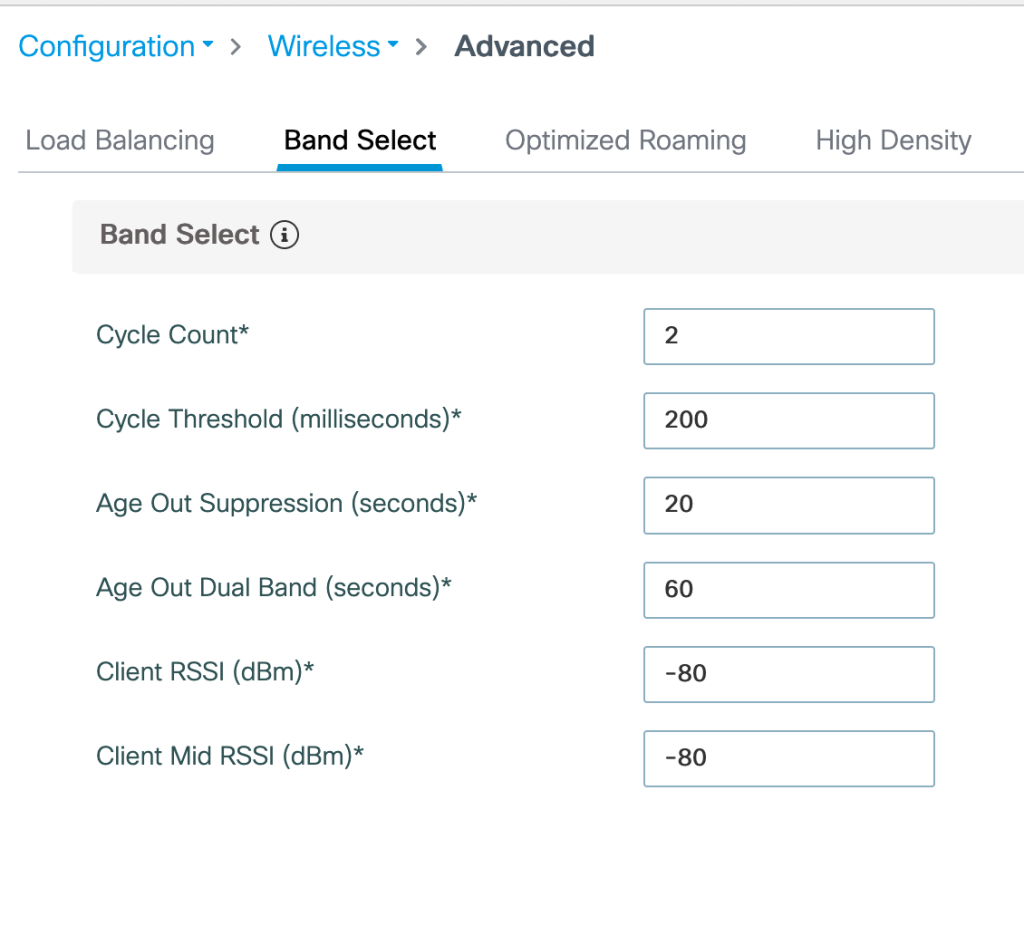
Cycle Count (1 to 10)- Cycle count stands for the number of times for which the probe request from a client will be suppressed for a new client.
Cycle Threshold (1 to 1000 ms)- Cycle Threshold is the time duration for which new probe requests coming from new clients will not result in increment in cycle count. eg. if the value is configured as 200 ms, cycle count will increase only when new probe request is heard by AP after 200 ms cycle.
Age Out Suppression (10-200 sec)- It sets the time cycle for pruning known 802.11 b/g/n clients. After the timer expires, all clients are considered new and subject to probe response suppression.
Age Out Dual Band (10-300 sec)- It sets the time cycle for pruning known dual band clients. After the timer expires, all clients are considered new and subject to probe response suppression. eg. If a client is previously identified as a dual band client, until this timer expires the client is not identified as legacy client and be considered a new client. (This prevents client associated to 5 GHz radio to associate back to 2.4 GHz radio)
Client RSSI– This is average of the RSSI of client packets received.
Client mid RSSI– This is the instantaneous RSSI of probe packets received.
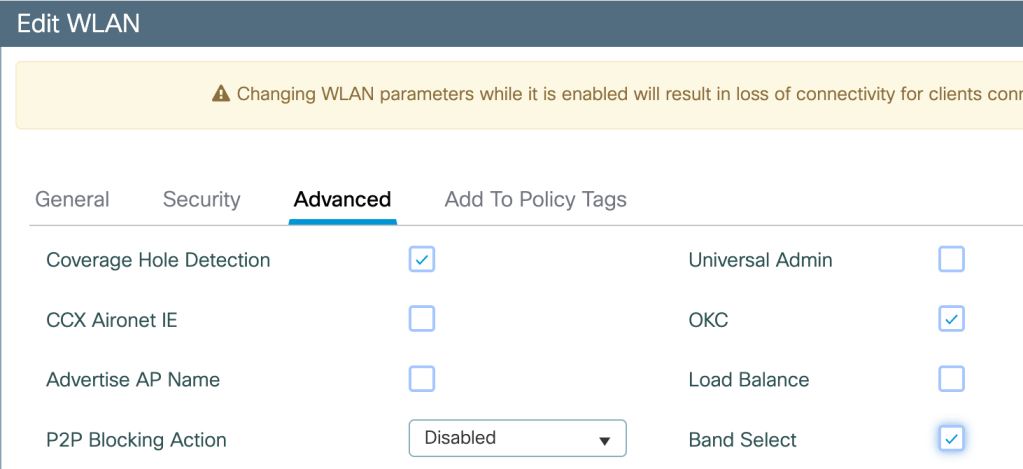
Enabling Band Select per WLAN– Configuration>Tags and Profiles>WLANs>Advanced
Band Select Algorithm– If the client RSSI is within the metrics defined in Band Select RSSI values then,
-For dual band clients, the AP does not send probe responses to any 2.4 GHz probe requests but responds to 5 GHz probe requests.
-For 2.4 GHz clients, the AP responds to 2.4 GHz probe requests only after probe suppression cycle.
-When the client’s probe count matches cycle count, the algorithm waits for the Age Out suppression time, marks the cycle count to 0 and restarts.
Band Select Considerations
-Enabling this feature is not recommended for WLANs serving time sensitive traffic.
-Enabling this feature can result in roaming delays or dropped voice calls.
-Band Select feature directs dual band clients from 2.4 GHz to 5 GHz radio only on same AP and when both radios are operational.
-Band Select configuration is defined globally but enabled per WLAN.
Related Blogs
Cisco Wireless Features
Comprehensive Reads
 blogscisco.com